
New This Week: Top Ideas, Trending Now, and Better Job-Ad Signals
A product update on the new Top Ideas and Trending Now views, the redesigned first-run flow, richer newsletter previews, and the job-ad signal pipeline improvements behind better business ideas.
Introduction
This week we shipped a set of updates aimed at one thing: making it faster to move from "what should I look at?" to "this idea is worth investigating."
The biggest visible changes are new ways to browse the strongest and freshest business ideas. Under the hood, we also improved how job ads become market signals, so company hiring patterns can feed the same idea discovery pipeline as community conversations.
Top Ideas and Trending Now
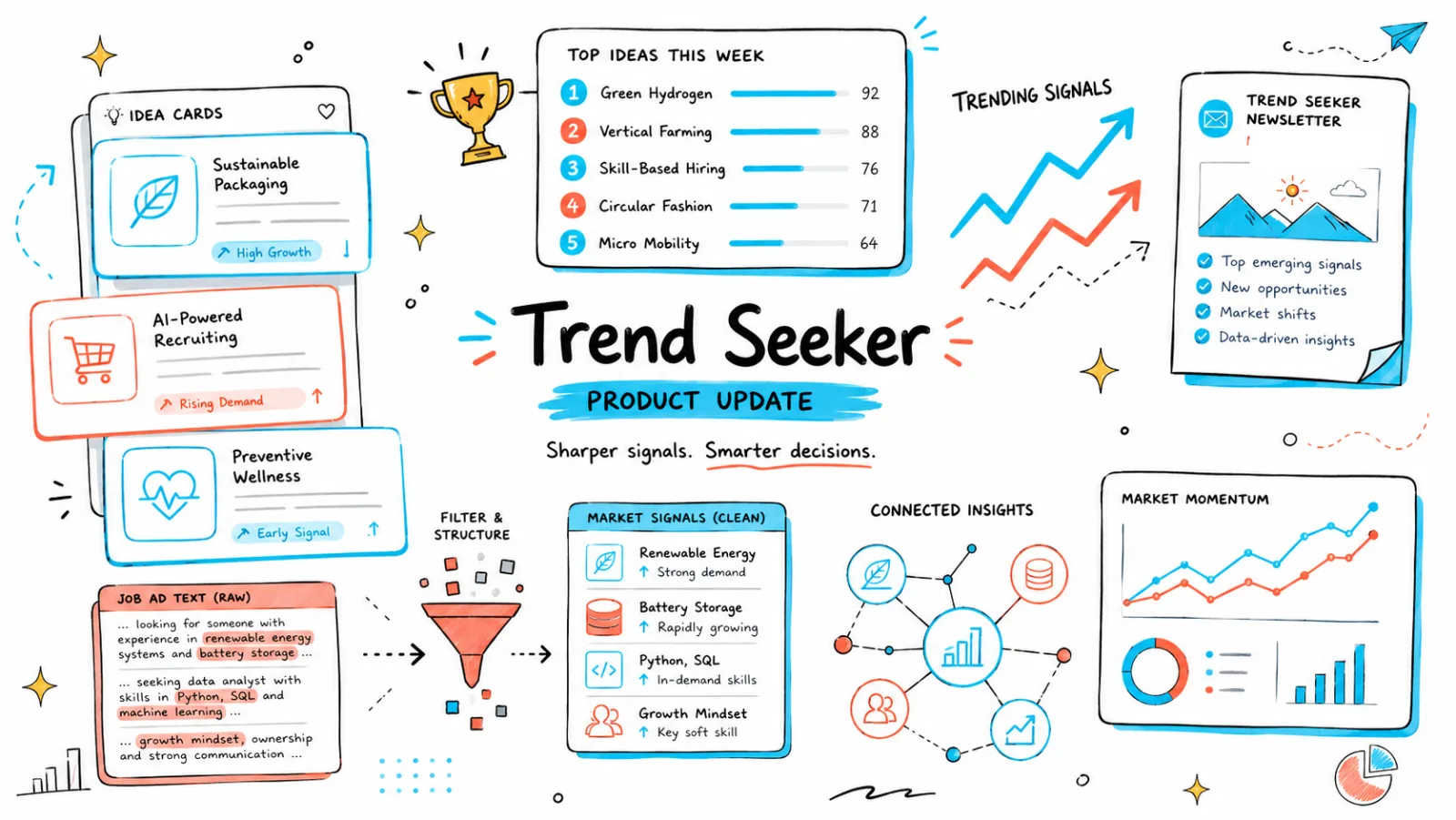
The Ideas page now has a more direct path into two high-signal views: Top Ideas and Trending Now.
Top Ideas highlights ideas with the strongest total signal volume. These are the opportunities that have accumulated the most supporting evidence across source posts and signals.
Trending Now focuses on ideas gaining new evidence today. That view is useful when you want to see what is heating up now, not only what has been strong historically.
| View | Best for | What it prioritizes |
|---|---|---|
| Top Ideas | Finding proven demand | Total signal volume |
| Trending Now | Spotting fresh movement | Signals added today |
| Newsletter | Reading the weekly market brief | Editorially grouped weekly themes |
| Job-ad signals | Finding B2B workflow demand | Company hiring patterns and operational pain |
Free users can still inspect a sample of the strongest ideas. Premium ideas now show clearer locked previews with category, signal count, recency, and visual context, so the list still communicates what kind of opportunity is behind the lock before you upgrade.
A Clearer First Visit
New visitors now see a guided Trend Seeker intro before landing in the weekly brief and live ideas feed. The goal is to explain the workflow in the product itself: scan real conversations, read the weekly signal summary, then explore live ideas by freshness, category, or trend strength.
The welcome flow is intentionally short. It introduces what Trend Seeker does, then hands off to the weekly brief instead of dropping people into a dense idea grid without context.
Richer Newsletter Previews
The weekly newsletter preview on the Ideas page now does more work before you open the full issue. It shows the week, headline, major themes, a visual summary, and the top signals from the issue.
Signal cards can link directly into the matching idea, making the newsletter less like a static announcement and more like an entry point into the live database. We also cleaned up newsletter ranking labels so scores and weekly changes are easier to interpret.
Better Job-Ad Signal Quality
Earlier this year we added business ideas from job ad signals. This week we improved the signal pipeline behind that source.
Job ads are noisy. A typical description includes benefits, qualifications, EEO language, tool lists, and generic company copy. Those sections are not useful demand signals. The useful parts are the paragraphs that describe customer workflows, operational pressure, product direction, automation needs, data problems, integration work, reliability work, or scaling pain.
The new JAI gate classifies job descriptions at paragraph level before sending signals forward. In practical terms, Trend Seeker is trying to keep paragraphs like "we are automating a manual compliance workflow for enterprise customers" and drop paragraphs like "5+ years of experience with SQL preferred."
Under the hood: the job-ad consumer now splits descriptions into paragraphs, filters inactive jobs and low-signal sections, scores remaining product/workflow paragraphs, forwards up to three high-quality job-ad signals per job, embeds them, and matches them into existing idea clusters when similarity is high enough. Unmatched signals can form durable seed clusters before a new idea is created.
flowchart TD
  A["Raw job ad"] --> B["Split into paragraphs"]
  B --> C["Drop boilerplate, requirements, benefits, and inactive jobs"]
  C --> D["Keep workflow, product, operations, and scaling pain"]
  D --> E["Score and rank useful paragraphs"]
  E --> F["Forward up to 3 job-ad signals"]
  F --> G["Embed signal text"]
  G --> H{"Similar to an existing idea?"}
  H -- "Yes" --> I["Attach to existing idea"]
  H -- "No" --> J["Collect in seed cluster"]
  J --> K["Create new idea when evidence is strong enough"]
This matters because job ads surface a different class of opportunity than Reddit or community posts. Community signals often reveal explicit user complaints. Job ads reveal where companies are spending budget to solve operational problems with headcount. Combining both sources gives a broader view of demand.
How to Use the New Flow
If you want the fastest path through the new experience, start with the latest newsletter for the weekly overview, then open Trending Now to see fresh demand, and use Top Ideas when you want the strongest overall evidence.
If B2B ideas are your focus, keep an eye on job-ad-backed opportunities. They are especially useful when you want to find internal workflow problems, compliance bottlenecks, RevOps gaps, data operations work, and automation needs that companies are already hiring around.
Browse the updated Ideas page, read the weekly brief, or revisit our guide to discovering business ideas from job ad signals.
Ready to find your next business idea?
Explore validated business ideas backed by real user demand.